
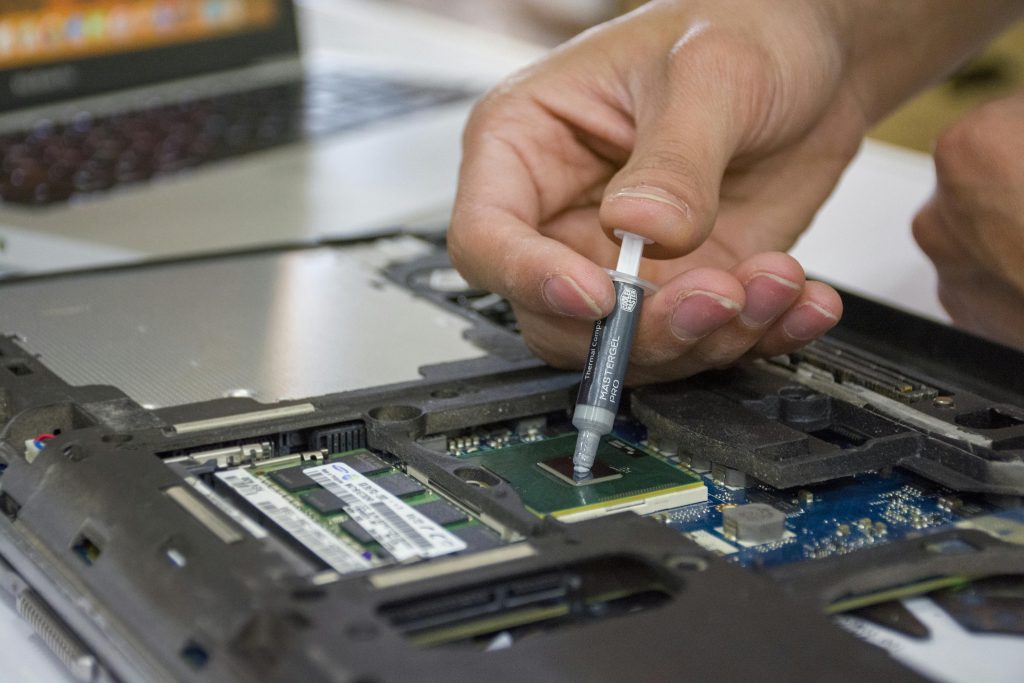
What is Thermal Paste?
Thermal paste (also known as thermal compound or thermal grease) is a paste-like substance applied between the CPU/GPU and the heatsink (or cooler). Its primary job is to fill in microscopic gaps between the surfaces to ensure optimal heat transfer from the processor to the cooler. Without thermal paste, your CPU or GPU would overheat quickly, potentially leading to system instability, crashes, or long-term damage.
Why is Changing Thermal Paste Important?
Over time, thermal paste breaks down and loses its ability to efficiently transfer heat. When this happens, your processor or graphics card can overheat, which can lead to a whole host of issues. Here are a few reasons why changing thermal paste is essential for keeping your PC in top shape:
1. Improved Heat Transfer
Fresh thermal paste improves the bond between the CPU (or GPU) and the heatsink, ensuring that heat is transferred more effectively. As the paste ages, its thermal conductivity decreases, which means it becomes less efficient at transferring heat away from your CPU or GPU. Replacing it ensures your system remains cool, even under heavy loads.
2. Preventing Overheating
As thermal paste degrades, the temperature of your CPU or GPU starts to rise. This can cause your system to enter thermal throttling—where the processor slows down to avoid overheating. This might not be noticeable during light tasks, but under gaming or heavy workloads, you might experience sudden drops in performance or even system crashes. Fresh thermal paste helps prevent overheating and ensures that your system maintains its peak performance.
3. Ensuring Longevity of Your Components
Heat is one of the biggest enemies of PC components. High temperatures can significantly reduce the lifespan of your CPU, GPU, and other internal parts. By keeping temperatures in check with fresh thermal paste, you can extend the life of your components, potentially saving you money on costly replacements down the road.
4. Enhanced Performance
For gamers, streamers, or anyone using their PC for demanding tasks like video editing or 3D rendering, keeping temperatures in the optimal range is essential. Without adequate cooling, your PC might throttle performance, leading to lower frame rates or slower processing times. Regularly changing the thermal paste ensures that your system runs as smoothly as possible, especially during intense gaming sessions or demanding workloads.
When Should You Replace Your Thermal Paste?
Thermal paste doesn’t last forever. While there’s no definitive expiration date, it’s generally recommended to replace it every 1 to 2 years, depending on usage and the type of thermal paste you use. However, there are certain signs that can indicate it’s time for a replacement:
- High Temperatures: If your PC is running hotter than usual, especially under load, it might be time to replace the thermal paste.
- Overheating Issues: Frequent crashes, sudden slowdowns, or thermal throttling could be caused by degraded thermal paste.
- After a CPU Cooler Upgrade or Cleaning: If you’ve recently removed the cooler for cleaning or upgrading, it’s a good idea to reapply fresh thermal paste before reattaching the cooler.
If you’re disassembling your PC for cleaning or maintenance, it’s always a good idea to take a quick look at the thermal paste. If it’s dry, cracked, or looks uneven, it’s time for a fresh coat.
How to Replace Your Thermal Paste
Replacing thermal paste is relatively easy, but it requires a bit of patience and care. Here’s a step-by-step guide on how to do it:
- Turn off your PC and unplug it from the power source.
- Remove the heatsink or cooler. Depending on your setup, this could involve unscrewing bolts or removing a bracket.
- Clean the CPU and cooler. Use isopropyl alcohol (at least 90%) and a lint-free cloth or paper towel to gently clean off the old thermal paste from both the CPU and the heatsink. Be careful not to scratch the surface.
- Apply a small amount of fresh thermal paste. A small pea-sized amount in the center of the CPU is typically enough. You don’t need to spread it yourself; when you reattach the cooler, the paste will spread evenly.
- Reattach the cooler. Carefully place the cooler back onto the CPU, making sure to apply even pressure to ensure proper contact.
- Reassemble your PC and power it back on.
That’s it! After applying fresh thermal paste, you should notice improved temperatures, especially under load.
Conclusion
Changing thermal paste may not be the most glamorous part of PC maintenance, but it’s one of the most important for ensuring your system runs smoothly and efficiently. Regularly replacing the thermal paste helps to prevent overheating, ensures your components stay cool, and can even extend the life of your PC. If you haven’t replaced your thermal paste in a while, it might be time to do so—your PC will thank you for it!